
<SOAPBOX>
I'm normally a pretty optimistic fellow. I have a healthy and happy family. My company is starting to really click. It's even sunny and clear outside as I write this. But I was under a dark cloud yesterday, and still am today.
The company healthcare is going up 30% from last year. And last year it went up 30%. Absurdly enough, the year before that it went up 30%. That's right, the company health care costs HAVE DOUBLED IN THREE YEARS.
Why isn't healthcare a greater priority? Why isn't big business railing against these rising costs? Unless big business is either offloading the costs or cutting special deals, I don't understand the silence. I'm shouting right now, but we are tiny next to the Microsofts, Boeings and StarBucks of our region. Maybe I'm already an anachranism believing a company should provide medical coverage for its employees. These people are working hard and doing right by us; I will do right by them.
I'm told again and again we have the greatest healthcare in the world. I have to believe we also have the costliest healthcare in the world. What happens when the greatest meets the costliest? It becomes the most USELESS because it won't cover enough people.
</SOAPBOX>
Tuesday, October 31, 2006

Sunday, October 29, 2006
MS Project, MindJet, SharePoint and Groove Interconnected
Doesn't seem possible, does it? How can four very different applications work together?
With one unique application.
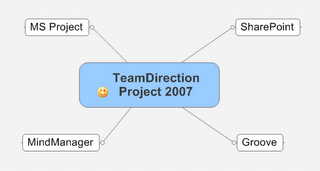
TeamDirection Project 2007 has the robustness of an athlete, the wherewithal of a concierge and the communication skills of a diplomat. But perhaps most importantly it brings project management to a more human level.
We realize there are people involved in projects. This is why we integrated Instant Messaging right into the project view. We made it behave very similarly to SharePoint integration with MS Office apps so SharePoint (and Groove) users will be right at home.
But the real benefits are for team members who don't need a project management tool. Rather, they just need their browsers to point to SharePoint workspaces. Or if they have the newest MS Office family member, Groove 2007, then join Groove workspaces that take advantage of forms. The important thing is these team members need no additional software to participate in the project and complete their tasks.
We also aim to make the project manager's life a little better too. It's now very easy to move data from MS Project into TeamDirection, and from TeamDirection back to MS Project. Not import/export, but full synchronization. And not necessarily the entire project.
For example, while a project manager may be perfectly at home in a 1000 task project, sometimes its easier for a team to work on smaller pieces. TeamDirection Project lets the project manager identify a summary task as the piece of the project to share. Once in the TeamDirection system, we maintain a link to the summary task's origin and allow it to be published to either SharePoint Task Lists or Groove Task Lists. TeamDirection Project will then gather task data as people update their assigned tasks and synchronize that data with original summary task (and its children) in MS Project. It may sound difficult, but we've got it down to two clicks.
The result is any summary task can become a shared task list.
And not just MS Project summary tasks, but also topics and subtopics. The observant readers may have recognized the simple diagram above as a MindMap. We've found MindJet's MindManager is not only a great way to conceptualize a project but a powerful way to communicate it to a broad audience. TeamDirection Project takes it one step further-- it gives you a simple way to connect projects and tasks to individual team members, through SharePoint and Groove, so you can now execute and track them too.
Finally, we've made a few project management enhancements we're proud of. Things like an improved, interactive Gantt chart and a better Task grid. Useful features like multi-level undo, multi-project views with filtering, a very handy project organizer to group projects and 'smart folders' to quickly identify late ones.
Our philosophy at TeamDirection is 'The Right Tool for the Job.' We could spend years trying to make a project management solution do everything anybody ever wanted. But then it would end up looking something like this.
We believe in the right tool for the job. One of our jobs is making project management easy, accessible and useful. But our other job is to make sure the task data you need is in the application you want. MS Project, MindJet, SharePoint and Groove are a few such applications, but there are many more out there. Most of the world's projects are started with Excel. More and more task lists are executed with next generation web applications like BaseCamp and @Task. TeamDirection helps you make sure your projects are completed with the right tool for the right audience.

With one unique application.
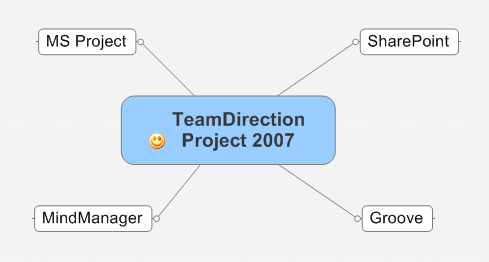
TeamDirection Project 2007 has the robustness of an athlete, the wherewithal of a concierge and the communication skills of a diplomat. But perhaps most importantly it brings project management to a more human level.
We realize there are people involved in projects. This is why we integrated Instant Messaging right into the project view. We made it behave very similarly to SharePoint integration with MS Office apps so SharePoint (and Groove) users will be right at home.
But the real benefits are for team members who don't need a project management tool. Rather, they just need their browsers to point to SharePoint workspaces. Or if they have the newest MS Office family member, Groove 2007, then join Groove workspaces that take advantage of forms. The important thing is these team members need no additional software to participate in the project and complete their tasks.
We also aim to make the project manager's life a little better too. It's now very easy to move data from MS Project into TeamDirection, and from TeamDirection back to MS Project. Not import/export, but full synchronization. And not necessarily the entire project.
For example, while a project manager may be perfectly at home in a 1000 task project, sometimes its easier for a team to work on smaller pieces. TeamDirection Project lets the project manager identify a summary task as the piece of the project to share. Once in the TeamDirection system, we maintain a link to the summary task's origin and allow it to be published to either SharePoint Task Lists or Groove Task Lists. TeamDirection Project will then gather task data as people update their assigned tasks and synchronize that data with original summary task (and its children) in MS Project. It may sound difficult, but we've got it down to two clicks.
The result is any summary task can become a shared task list.
And not just MS Project summary tasks, but also topics and subtopics. The observant readers may have recognized the simple diagram above as a MindMap. We've found MindJet's MindManager is not only a great way to conceptualize a project but a powerful way to communicate it to a broad audience. TeamDirection Project takes it one step further-- it gives you a simple way to connect projects and tasks to individual team members, through SharePoint and Groove, so you can now execute and track them too.
Finally, we've made a few project management enhancements we're proud of. Things like an improved, interactive Gantt chart and a better Task grid. Useful features like multi-level undo, multi-project views with filtering, a very handy project organizer to group projects and 'smart folders' to quickly identify late ones.
Our philosophy at TeamDirection is 'The Right Tool for the Job.' We could spend years trying to make a project management solution do everything anybody ever wanted. But then it would end up looking something like this.
We believe in the right tool for the job. One of our jobs is making project management easy, accessible and useful. But our other job is to make sure the task data you need is in the application you want. MS Project, MindJet, SharePoint and Groove are a few such applications, but there are many more out there. Most of the world's projects are started with Excel. More and more task lists are executed with next generation web applications like BaseCamp and @Task. TeamDirection helps you make sure your projects are completed with the right tool for the right audience.

Thursday, October 26, 2006
A Great PMI Show
The booth is in the car, the staff is back at work, the show is over. It went better than I expected. We've been at the last three PMI Global Congress shows (Baltimore, Anaheim and Seattle) and this was definitely our best. Probably because now we have our best product. Just about every demo I gave went really well. However, I did notice three things:
1) People who see or read about TeamDirection Project see our integration with SharePoint, but make the assumption that we only store project files on the SharePoint server and share those. While we do store a project file on the SharePoint site, we also synchronize information with the standard SharePoint Task List that team members can update with their browsers-- including Safari for Mac users.
Invariably, once I show this feature people's eyes light up and they respond 'so you're just like Project Server!' As far as interacting with SharePoint task lists, yes. But to compare TeamDirection Project to Project Server is like comparing a hybrid car to an 18 wheeler. Yes they both have wheels, but we focus more on executing the tasks at hand whereas Project Server is the entire enterprise solution.
Still, the basics are the same: distributing and updating tasks with a web browser.
2) We think one of our coolest features is the integrated Instant Messaging window showing each team members presence. This lets you instant message a team member whose task might have fallen behind and ask what's going on. Or its a good way to notify your team of any changes to the plan. When I point this out, people agree its very useful. But I think we might be able to do more to show how the instant member list can be the same as your team member list. Maybe a presence ball right next to the assignment info? It's definitely a valuable feature to help project managers stay in touch with their team.
I think a couple of simple flash demos on our site will help convey these features. Time to put the director hat back on for a bit.
3) What is up with Microsoft and Groove? I was very surprised at how few people knew about Groove. Microsoft bought Groove back in March 2005. It's rolling Groove into the next version of Office. Ray Ozzie is now the Chief Architect at Microsoft. I thought Groove awareness would have doubled or tripled by now. It's a very powerful solution and, surprising as it may sound, Microsoft seems to be underselling it right now. Perhaps things will change once Office 2007 ships.
Thanks to everyone who visited our booth and made the show such a success for us. A special thanks to everyone who told their friends and colleagues we deserve a visit. The last day of the show was actually our busiest, which I chalk up to the word getting around.
See you at the next show!
1) People who see or read about TeamDirection Project see our integration with SharePoint, but make the assumption that we only store project files on the SharePoint server and share those. While we do store a project file on the SharePoint site, we also synchronize information with the standard SharePoint Task List that team members can update with their browsers-- including Safari for Mac users.
Invariably, once I show this feature people's eyes light up and they respond 'so you're just like Project Server!' As far as interacting with SharePoint task lists, yes. But to compare TeamDirection Project to Project Server is like comparing a hybrid car to an 18 wheeler. Yes they both have wheels, but we focus more on executing the tasks at hand whereas Project Server is the entire enterprise solution.
Still, the basics are the same: distributing and updating tasks with a web browser.
2) We think one of our coolest features is the integrated Instant Messaging window showing each team members presence. This lets you instant message a team member whose task might have fallen behind and ask what's going on. Or its a good way to notify your team of any changes to the plan. When I point this out, people agree its very useful. But I think we might be able to do more to show how the instant member list can be the same as your team member list. Maybe a presence ball right next to the assignment info? It's definitely a valuable feature to help project managers stay in touch with their team.
I think a couple of simple flash demos on our site will help convey these features. Time to put the director hat back on for a bit.
3) What is up with Microsoft and Groove? I was very surprised at how few people knew about Groove. Microsoft bought Groove back in March 2005. It's rolling Groove into the next version of Office. Ray Ozzie is now the Chief Architect at Microsoft. I thought Groove awareness would have doubled or tripled by now. It's a very powerful solution and, surprising as it may sound, Microsoft seems to be underselling it right now. Perhaps things will change once Office 2007 ships.
Thanks to everyone who visited our booth and made the show such a success for us. A special thanks to everyone who told their friends and colleagues we deserve a visit. The last day of the show was actually our busiest, which I chalk up to the word getting around.
See you at the next show!
Saturday, October 21, 2006
Getting Ready for PMI Congress in Seattle
It's nice its in Seattle this year. It gives us an opportunity to do a few things we couldn't normally do. For instance, I just got back from BigInk, a local company, that does out-of-the-ordinary printing. I asked them to print an 8 foot by 10 foot banner of text and graphics and they did an awesome job.
I'm about to hop in the car, set up the booth, hang the banner and get our systems all running. If you're there, I hope you notice it.
We've got half the company helping out with the show, most notably our developers. There is NOTHING like first-hand customer feedback, and this is our opportunity to educate our developers as much as our customers.
So if you're at the show and you come buy our booth (#1220), you might just meet one of our developers. Feel free to pepper him with requests about what you'd like to see. Let him know what works and what doesn't. Educate him that writing software is more than writing code, its making it work for the end user as well. Stand up and be heard!
And then watch as your suggestions come to life.
I'm about to hop in the car, set up the booth, hang the banner and get our systems all running. If you're there, I hope you notice it.
We've got half the company helping out with the show, most notably our developers. There is NOTHING like first-hand customer feedback, and this is our opportunity to educate our developers as much as our customers.
So if you're at the show and you come buy our booth (#1220), you might just meet one of our developers. Feel free to pepper him with requests about what you'd like to see. Let him know what works and what doesn't. Educate him that writing software is more than writing code, its making it work for the end user as well. Stand up and be heard!
And then watch as your suggestions come to life.
Friday, October 20, 2006
TeamDirection Project 2007 Released to BETA
Whew!
A big Thank You to everyone at TeamDirection for the next generation. Good Work Everybody!
Have you ever written software and released a BETA? It's alot of hard work. And these days you have to worry about web sites, marketing and partner communications too. Remember the old days where you put your code on a floppy or two, take out a classified ad and wait?
I don't either; I'm not that old. But that's what they tell me.
I like today better. In the old days you had to worry about packaging too, but I think that's been replaced by web sites, more or less. I suppose the big vendors (Microsoft, Adobe and such) still need to worry about it. But you can download our software, with a fast connection, in 30 seconds or so. And if you like it, you can buy it in 60.
I think the software industry might actually be improving!
I know our product is improving. I can't wait to tell you why its so great, but I'll have too. I'm still tired after a lot of hard work.
Some things never change.
Friday, October 13, 2006
Whither Adobe
Google bought YouTube. Good for them.
But did you know Adobe Systems made YouTube possible? Their flash player has excellent compression and does the best job of being cross-platform. Will some of that $1.6 billion rub off on Adobe?
(Full Disclaimer: I'm a former employee and my kids college fund has Adobe stock-- but you should still buy as much as possible)
Go read Ryan Stewarts blog for more reasons why Adobe might be the best software company you've never heard of.
On another note, we've kicked around the idea of having a project viewer using Flash. Maybe we should revisit that...
But did you know Adobe Systems made YouTube possible? Their flash player has excellent compression and does the best job of being cross-platform. Will some of that $1.6 billion rub off on Adobe?
(Full Disclaimer: I'm a former employee and my kids college fund has Adobe stock-- but you should still buy as much as possible)
Go read Ryan Stewarts blog for more reasons why Adobe might be the best software company you've never heard of.
On another note, we've kicked around the idea of having a project viewer using Flash. Maybe we should revisit that...
Thursday, October 12, 2006
Marriage of Social And Business Applications
Richard MacManus posted a lengthy article of mine over at his site. It's a variation of a theme I've mentioned before, but I like how it turned out (and how it was editied). I'll certainly take this opportunity to show how our Project Management product is a nifty marriage of Social and Business apps, but I thought I'd touch on a couple other 'stalwart' applications as well and see how they could benefit from a similiar entanglement.
The topic will only grow in importance as Office 2007 comes out, Google releases it's online productivity offerrings and Ray Ozzie pushes the 'Live' rejoinders out of Microsoft.
I know Richard thought 2007 would be the year of RSS, but I'm thinking its the year social and business go hand in hand.
The topic will only grow in importance as Office 2007 comes out, Google releases it's online productivity offerrings and Ray Ozzie pushes the 'Live' rejoinders out of Microsoft.
I know Richard thought 2007 would be the year of RSS, but I'm thinking its the year social and business go hand in hand.
Wednesday, October 11, 2006
International Project Management Day
No Kidding.
I was doing a search for Social Project Management and came up with this.
I wonder how it is to be celebrated. It says here:
Hmmm...
So no roses?
I was doing a search for Social Project Management and came up with this.
I wonder how it is to be celebrated. It says here:
Suggested events: internal company meetings, presentations about the value of project management, recognition breakfasts, lunches or receptions honoring project teams, local government recognition or proclamation, coordinated Project Management professional association events (PMI, IPMA, AIPM, etc.)or recognition at a previously scheduled project management event.
Hmmm...
So no roses?
Tuesday, October 10, 2006
Google Docs & Spreadsheets
I just saw the latest from Google in the form of Google Docs & Spreadsheets. It definitely looks interesting. And I like that you can upload (max of 500k) MS Word and MS Excel files.
I think the single biggest feature could be multiple people working on a document online at the same time. I know this was a huge feature with Groove 3.x (sorry to see it go). It's nice to see Google picking it up. That 'Collaborate' tab on the top right definitely has me intrigued.
And you can export as a Word document again, or other types. Cool.
But (can I write this on blogger, owned by Google?) some missing features come to mind (or maybe I just missed them... its been known to happen):
How are you supposed to work on documents offline?
Since its from Google, is everything searchable? Are everyone's drafts and revisions searchable? If so, it may not be the best idea.
And as as a software developer, I'd love to plug some of these holes-- and think of new stuff. When will the API be published?
I think the single biggest feature could be multiple people working on a document online at the same time. I know this was a huge feature with Groove 3.x (sorry to see it go). It's nice to see Google picking it up. That 'Collaborate' tab on the top right definitely has me intrigued.
And you can export as a Word document again, or other types. Cool.
But (can I write this on blogger, owned by Google?) some missing features come to mind (or maybe I just missed them... its been known to happen):
How are you supposed to work on documents offline?
Since its from Google, is everything searchable? Are everyone's drafts and revisions searchable? If so, it may not be the best idea.
And as as a software developer, I'd love to plug some of these holes-- and think of new stuff. When will the API be published?
Sunday, October 08, 2006
Nice Article on Groove and SharePoint at LSU
Microsoft has published an informative article on Groove and SharePoint helping build an emergency operations center on the Gulf Coast.
It's a nice summary of not only what each individual product can bring, but also how they can work together and complement each other.
Read it here.
It's a nice summary of not only what each individual product can bring, but also how they can work together and complement each other.
Read it here.
Wednesday, October 04, 2006
Use MS Project Online, Use SharePoint Offline
Have you ever wanted to publish an MS Project summary task to a SharePoint task list? What about pulling your SharePoint tasks onto your local machine and unplugging from the network? Our next version of TeamDirection Project will bring these and other very useful features to a marketplace waiting to see what Office 2007 has to offer.
As I've written before, there is a new type of application emerging to handle the current dichotomy of desktop and online environments. It has to be socially adept so as to gain acceptance on the desktop, it has to be able to enhance communication in order to be effective and it has to integrate with current business systems in order to pass the muster with IT. I've taken to calling these kinds of applications 'Social Business Applications.'
What exactly is a social application? As Ebrahim Ezzy observes, one that allows groups of people to coordinate certain kinds of interaction. Like EMail, for example.
And a business application? Microsoft states: business applications are any application important to running your business. Like EMail, for example.
Wait a second. Could EMail be the first social business application?
Yes it could. And it also happens to be the most successful application of all time. The reason is simple: because it shares aspects of both social and business computing, it can be everywhere. Desktops or webtops, phones or blackberries. And because it shares aspects of both, it can be used by corporate CEOs or PTA moms-- anyone who requires coordinating group interaction.
That sounds like the definition for social business applications: software that coordinates group interaction important to running your business.
We at TeamDirection think one of the segments to benefit from the convergence of social and business application development is Project Management. Richard MacManus of ReadWriteWeb agrees with this assessment as well.
What does this mean for you?
How about integrating Instant Messaging right into the project so that you can see when the people you've assigned tasks to are online. What would you rather do, send an email regarding a late task and wait for a response, or see their real-time presence and talk to them immediately?.
How about pulling a summary task and its children from MS Project and publishing it to a SharePoint or Groove task list in a workspace for everyone to report their progress AND pushing that updated information back into MS Project.
We think its the best of both worlds: online/offline, rich desktop apps and browser-based, simple web apps.
The sum really can be greater than the parts!
As I've written before, there is a new type of application emerging to handle the current dichotomy of desktop and online environments. It has to be socially adept so as to gain acceptance on the desktop, it has to be able to enhance communication in order to be effective and it has to integrate with current business systems in order to pass the muster with IT. I've taken to calling these kinds of applications 'Social Business Applications.'
What exactly is a social application? As Ebrahim Ezzy observes, one that allows groups of people to coordinate certain kinds of interaction. Like EMail, for example.
And a business application? Microsoft states: business applications are any application important to running your business. Like EMail, for example.
Wait a second. Could EMail be the first social business application?
Yes it could. And it also happens to be the most successful application of all time. The reason is simple: because it shares aspects of both social and business computing, it can be everywhere. Desktops or webtops, phones or blackberries. And because it shares aspects of both, it can be used by corporate CEOs or PTA moms-- anyone who requires coordinating group interaction.
That sounds like the definition for social business applications: software that coordinates group interaction important to running your business.
We at TeamDirection think one of the segments to benefit from the convergence of social and business application development is Project Management. Richard MacManus of ReadWriteWeb agrees with this assessment as well.
What does this mean for you?
How about integrating Instant Messaging right into the project so that you can see when the people you've assigned tasks to are online. What would you rather do, send an email regarding a late task and wait for a response, or see their real-time presence and talk to them immediately?.
How about pulling a summary task and its children from MS Project and publishing it to a SharePoint or Groove task list in a workspace for everyone to report their progress AND pushing that updated information back into MS Project.
We think its the best of both worlds: online/offline, rich desktop apps and browser-based, simple web apps.
The sum really can be greater than the parts!
Monday, October 02, 2006
How did I Miss BaseCamp's API?
A couple of posts ago I took a look at BaseCamp from 37Signals and gave it a reasonable review. Although, in all honesty, what I really want is for people to buy our product and choose the best presentation for their constituents. Sometimes a project managemer may want to share their task list with SharePoint, sometimes with Groove and I'll wager a few times with BaseCamp as well.
If only they had an API...
Oh my golly, look at this.
OK, right about now my wife will tell you how I couldn't find a baby bottle if it was in my mouth, but once I do find something, lookout-- I latch onto it like a baby with a bottle!
I'll be taking a look at the BaseCamp API in the days ahead. It fits with our philosophy: we think project data is your data and you should decide where and how to use it.
It would be really cool to add BaseCamp alongside SharePoint and Groove. Maybe I should give 37Signals a call?
If only they had an API...
Oh my golly, look at this.
OK, right about now my wife will tell you how I couldn't find a baby bottle if it was in my mouth, but once I do find something, lookout-- I latch onto it like a baby with a bottle!
I'll be taking a look at the BaseCamp API in the days ahead. It fits with our philosophy: we think project data is your data and you should decide where and how to use it.
It would be really cool to add BaseCamp alongside SharePoint and Groove. Maybe I should give 37Signals a call?
Thursday, September 28, 2006
Struck by Washington Post Headlines
Maybe its an accident, but I could help but notice these two headlines right next to each other on the 'front page' of their web site.
Many Rights in U.S. Legal System Absent in New Bill link
House Panel Digs Deep in HP Spy Case link
This isn't a political commentary blog, but I was struck nonetheless.
Many Rights in U.S. Legal System Absent in New Bill link
House Panel Digs Deep in HP Spy Case link
This isn't a political commentary blog, but I was struck nonetheless.
Sunday, September 24, 2006
American Warbird
I've been completely remiss in my duties in sharing Kevin Kegin's American Warbird as a great time. They travel the country with refurbished vintage aircraft and take wanna-pretend-to-be pilots like myself for rides. Not only do you get to see what its like to fly these old planes, but you also get to remember the 'gee-whiz' thrill you had a long time ago as a little boy or girl.
Here's what I flew in.

That's Kevin in the back, and not me in the front. I'm taking the photo and getting ready to go next. In front. With the canopy open. Talk about a rush!
It was a gorgeous day. Temperature in the mid 60s, light fluffy clouds to fly around and a brilliant sun making everything glow.
I can't remember the exact model of the airplane-- check the site for that-- but I can tell you it can do a loop, a barrel roll and an aileron roll. And you can buy the video of yourself acting giddy as you do all three.
Yee Haa!
Here's what I flew in.

That's Kevin in the back, and not me in the front. I'm taking the photo and getting ready to go next. In front. With the canopy open. Talk about a rush!
It was a gorgeous day. Temperature in the mid 60s, light fluffy clouds to fly around and a brilliant sun making everything glow.
I can't remember the exact model of the airplane-- check the site for that-- but I can tell you it can do a loop, a barrel roll and an aileron roll. And you can buy the video of yourself acting giddy as you do all three.
Yee Haa!
Identifying with Customers
You may have noticed a new look on our home page. The pretty flash movie is gone in favor of a simple yet (hopefully) common story that bedevils project managers every day. This is the start of TeamDirection's efforts to better connect with current customers as we navigate the transition from Groove 3.x to Groove 2007, and new customers who are used to the SharePoint experience.
As I've mentioned before, I think Microsoft's purchase of Groove was brilliant, and I think they see the power of SharePoint, Groove and Project Management together as they've created a business group for the three. However, I've come to the conclusion that the SharePoint audience has a completely different set of expectations from the Groove audience. As such, it takes a completely different message.
SharePoint users expect SharePoint applications to use SharePoint web parts. This is not so dissimliar to Groove 3.x customers who expected Groove appilcations to use Groove tool templates. But whither the web services? People wanted the web parts and the tool templates, leaving the web services to the tech heads to figure out what to do.
Well, since Groove 2007 no longer allows non-microsoft applications to live within Groove, we had to figure out what to do. Solutions for the Groove platform have three choices: Groove Forms, Groove Web Services, or both. Interestingly enough, these are also the choices for SharePoint: SharePoint Web Parts, SharePoint Web Services, or both. So we chose Both and Both. We created a Task List using a Groove Form, we utilized the Task List that ships with SharePoint and we tied them all together with web services.
But now we have to describe it to interested parties. While Groove users seem to have no problem installing a webified desktop application, SharePoint users seem to much prefer a solution through the SharePoint server.
Which makes me very curious for the near future with respect to crossover: will we have two distinct marketing strategies for these two similar collaborative platforms or will the marketing strategies coalesce as people become more comfortable with the two? Time will tell.
Of course, there's also that class of user that doesn't use SharePoint or Groove. Don't worry, we're thinking about you too!
As I've mentioned before, I think Microsoft's purchase of Groove was brilliant, and I think they see the power of SharePoint, Groove and Project Management together as they've created a business group for the three. However, I've come to the conclusion that the SharePoint audience has a completely different set of expectations from the Groove audience. As such, it takes a completely different message.
SharePoint users expect SharePoint applications to use SharePoint web parts. This is not so dissimliar to Groove 3.x customers who expected Groove appilcations to use Groove tool templates. But whither the web services? People wanted the web parts and the tool templates, leaving the web services to the tech heads to figure out what to do.
Well, since Groove 2007 no longer allows non-microsoft applications to live within Groove, we had to figure out what to do. Solutions for the Groove platform have three choices: Groove Forms, Groove Web Services, or both. Interestingly enough, these are also the choices for SharePoint: SharePoint Web Parts, SharePoint Web Services, or both. So we chose Both and Both. We created a Task List using a Groove Form, we utilized the Task List that ships with SharePoint and we tied them all together with web services.
But now we have to describe it to interested parties. While Groove users seem to have no problem installing a webified desktop application, SharePoint users seem to much prefer a solution through the SharePoint server.
Which makes me very curious for the near future with respect to crossover: will we have two distinct marketing strategies for these two similar collaborative platforms or will the marketing strategies coalesce as people become more comfortable with the two? Time will tell.
Of course, there's also that class of user that doesn't use SharePoint or Groove. Don't worry, we're thinking about you too!
Wednesday, September 20, 2006
Andy Warhol is the Spiritual Father of Blogs and YouTube
"In the future, everyone will be world-famous for 15 minutes." -- Andy Warhol, Stockhom (1968)
PBS is running a four hour documentary on Andy Warhol this week and all I could think of were the sick days I took back in elementary school so that I might glimpse the world as my parents see it. This usually involved watching a lot of tv. And I always remembered the silver haired apparition as he would float occasionally from channel to channel, almost as if he was more a part of a tv cloud than any particular show. I think the reason his ghostly image imprinted itself on my memory was it brought on the first inkling of pathos for someone I didn't know, someone who seemed oddly stuck in a box.
I certainly couldn't understood what exactly made him famous. A matte of repeating soup cans? Please. It didn't occur to me it was his own insatiable need to be famous that made him interesting, if in a morbid 'car-wreck' kind of way. I didn't see then what I see now in that his genius was exposing the ordinary as artistic expression. His ticket may have been the Campbell soup cans, but his resonance was a result of tapping into every one's desire to be noticed, especially the ordinary people. It made him an excellent commercial illustrator, but an even better self-promoter.
It's like those modern art exhibits where the 'artist' takes a 10 foot by 10 foot canvas and drew a line down the middle. 'Any idiot can do that' is the natural reaction. It took me a while to realize that yes, any idiot can do the line, but how many people can rationalize it, promote it and sell it? That line down the middle of the paper is an in-your-face 'I can draw a line and call it art and you can't'.
Your 15 Minutes
What would you sacrifice for that 15 minutes of fame? A few minutes a day away from the family writing your blog? A few strands of your dignity when you post a video on YouTube? Do you want to create art, sell something or just record your existence?
Down the road a few years when my daughters take a sick day from school, will you be their ghostly apparition?
And would that be OK?
PBS is running a four hour documentary on Andy Warhol this week and all I could think of were the sick days I took back in elementary school so that I might glimpse the world as my parents see it. This usually involved watching a lot of tv. And I always remembered the silver haired apparition as he would float occasionally from channel to channel, almost as if he was more a part of a tv cloud than any particular show. I think the reason his ghostly image imprinted itself on my memory was it brought on the first inkling of pathos for someone I didn't know, someone who seemed oddly stuck in a box.
I certainly couldn't understood what exactly made him famous. A matte of repeating soup cans? Please. It didn't occur to me it was his own insatiable need to be famous that made him interesting, if in a morbid 'car-wreck' kind of way. I didn't see then what I see now in that his genius was exposing the ordinary as artistic expression. His ticket may have been the Campbell soup cans, but his resonance was a result of tapping into every one's desire to be noticed, especially the ordinary people. It made him an excellent commercial illustrator, but an even better self-promoter.
It's like those modern art exhibits where the 'artist' takes a 10 foot by 10 foot canvas and drew a line down the middle. 'Any idiot can do that' is the natural reaction. It took me a while to realize that yes, any idiot can do the line, but how many people can rationalize it, promote it and sell it? That line down the middle of the paper is an in-your-face 'I can draw a line and call it art and you can't'.
Your 15 Minutes
What would you sacrifice for that 15 minutes of fame? A few minutes a day away from the family writing your blog? A few strands of your dignity when you post a video on YouTube? Do you want to create art, sell something or just record your existence?
Down the road a few years when my daughters take a sick day from school, will you be their ghostly apparition?
And would that be OK?
Monday, September 18, 2006
Comparing BaseCamp and TeamDirection Project
The other day, Online Degree left a comment asking me if there are other project management software solutions I would recommend. Usually people are loathe to compare their products with potential competition since a) its basically impossible to be objective and b) nobody wants to give the competition free pr. However, Online Degree also said "You seem to be very knowledgeable about project management software," and flattery still works for me. And in truth, we do look at the competition because everyone has good ideas. Furthermore, proper product strategy requires you to know what's going on. So, let me break a taboo and compare BaseCamp with TeamDirection Project.
BaseCamp is a 100% web based application that runs on most browsers. While this is a challenging environment for products solving moderate to high complexity problems, BaseCamp carries it off with aplomb. I admire the group and their accomplishments in bringing richness to the web browser environment. The greatest advantage a web app enjoys over a desktop app is the guarantee that every user is running the same version.
TeamDirection Project is a hybrid desktop application. It does need to be installed on the desktop, but it comes with deep web service integration for both SharePoint and Groove. A simple version was released in July, but a richer version is coming in October that everyone is very excited about. It offers full integration with SharePoint and Groove Task Lists and Link Lists. This allows some users to use TeamDirection Project and other users to use browsers as everyone works on the same tasks in the same project. So to answer a question Online Degree raised, you could indeed have your Mac users work with TeamDirection Project through their Safari browsers and SharePoint.
The first thing I notice is we have similar philosophies for demystifying project management. Perhaps the best way to demistify a discipline is to make it understandable. Both products achieve this quite nicely with clear, straightforward language and well-thought out UI decisions and production. Neither product requires special training, and in fact offer the ability to be productive within 10 minutes. (One of the greatest compliments you can give any product I write is 'It's a simple product'. Products are rarely simple. If someone thinks it is, then I've done my job.) And because both projects do such a nice job of alleviating the intimidation of project management, they offer a palatable onramp for everyone who knows they should use more than a task list, but haven't.
Both products recognize the value of communication in order to execute a project successfully. But here we begin to see some tangible differences between a web app and a desktop app. Whereas BaseCamp creates a 'Messages' tool for its users, TeamDirection Project integrates with Microsoft Instant Messenger. While the BaseCamp solution will work on most browsers, the TeamDirection solution will work with most MS messengers and offers additional features like presence. This means if you have a question for a team member, you can see if he's online, send an instant message and get an instant answer. And, of course, Microsoft is improving instant messaging all the time.
Both products also recognize the value of ease of use. But again, we see what is possible with a web application versus what is possible with a desktop app. BaseCamp provides a nice way to create and update a task list, but very little to assist with scheduling, grouping and filtering. TeamDirection Project, on the other hand, has very rich scheduling, grouping and filtering support, and gets to use cpu power on your desktop to do some cool scheduling tricks. But you may not need scheduling right away; and if not, then BaseCamp is a very nice shared task list.
Finally you should ask yourself what you may need to support your projects. If you just need to share a task list with people, track progress and do simple reporting, then BaseCamp offers a compelling solution. However, if you would like to integrate your task list with any other system, then the web applications server side strength turns into a desktp liability in that your task data has very little mobility. TeamDirection Project has import, export and synchronization with MS Project (for all your reporting needs) and the ability to push, pull and synchronize data with SharePoint and Groove task lists-- nicely integrating with the MS Office system. If this sounds like a bit of a technological leap, then BaseCamp is a natural. But if this sounds like your current business requirements, then TeamDirection Project helps you get the most from your collaboration pieces.
Furthermore, TeamDirection Project is designed to facilitate the exchange of project related data across multiple systems. For example, we are also looking and integrating with MindManager in addition to MS Project. (We've received positive feedback so far.) In fact, if BaseCamp had a web services interface (which they may; I might have missed it), we would definitely look at integrating with BaseCamp much as we integrate with SharePoint and Groove. BaseCamp has an excellent task UI, better than either SharePoint's or Groove's task lists and we'd love to use it. Our basic philosophy is its your project data, you should be able to decide how best to work with it.
In the end it comes down to choice, as always. If I must rate them, then I would rate BaseCamp better in terms of getting started and working with simple task lists. And I would rate TeamDirection Project better in terms of integrating with other systems and providing more scheduling, task grouping and instant messaging functionality. But in truth, both provide you with the tools you need to create, execute and review your projects success.
BaseCamp is a monthly subscription with pricing info found here.
TeamDirection is a one-time purchase and will have two flavors:
1) TeamDirection Project
2) TeamDirection Project Plus
Most of what I've described above is the Plus version. Current pricing for TeamDirection Project can be found here.
BaseCamp is a 100% web based application that runs on most browsers. While this is a challenging environment for products solving moderate to high complexity problems, BaseCamp carries it off with aplomb. I admire the group and their accomplishments in bringing richness to the web browser environment. The greatest advantage a web app enjoys over a desktop app is the guarantee that every user is running the same version.
TeamDirection Project is a hybrid desktop application. It does need to be installed on the desktop, but it comes with deep web service integration for both SharePoint and Groove. A simple version was released in July, but a richer version is coming in October that everyone is very excited about. It offers full integration with SharePoint and Groove Task Lists and Link Lists. This allows some users to use TeamDirection Project and other users to use browsers as everyone works on the same tasks in the same project. So to answer a question Online Degree raised, you could indeed have your Mac users work with TeamDirection Project through their Safari browsers and SharePoint.
The first thing I notice is we have similar philosophies for demystifying project management. Perhaps the best way to demistify a discipline is to make it understandable. Both products achieve this quite nicely with clear, straightforward language and well-thought out UI decisions and production. Neither product requires special training, and in fact offer the ability to be productive within 10 minutes. (One of the greatest compliments you can give any product I write is 'It's a simple product'. Products are rarely simple. If someone thinks it is, then I've done my job.) And because both projects do such a nice job of alleviating the intimidation of project management, they offer a palatable onramp for everyone who knows they should use more than a task list, but haven't.
Both products recognize the value of communication in order to execute a project successfully. But here we begin to see some tangible differences between a web app and a desktop app. Whereas BaseCamp creates a 'Messages' tool for its users, TeamDirection Project integrates with Microsoft Instant Messenger. While the BaseCamp solution will work on most browsers, the TeamDirection solution will work with most MS messengers and offers additional features like presence. This means if you have a question for a team member, you can see if he's online, send an instant message and get an instant answer. And, of course, Microsoft is improving instant messaging all the time.
Both products also recognize the value of ease of use. But again, we see what is possible with a web application versus what is possible with a desktop app. BaseCamp provides a nice way to create and update a task list, but very little to assist with scheduling, grouping and filtering. TeamDirection Project, on the other hand, has very rich scheduling, grouping and filtering support, and gets to use cpu power on your desktop to do some cool scheduling tricks. But you may not need scheduling right away; and if not, then BaseCamp is a very nice shared task list.
Finally you should ask yourself what you may need to support your projects. If you just need to share a task list with people, track progress and do simple reporting, then BaseCamp offers a compelling solution. However, if you would like to integrate your task list with any other system, then the web applications server side strength turns into a desktp liability in that your task data has very little mobility. TeamDirection Project has import, export and synchronization with MS Project (for all your reporting needs) and the ability to push, pull and synchronize data with SharePoint and Groove task lists-- nicely integrating with the MS Office system. If this sounds like a bit of a technological leap, then BaseCamp is a natural. But if this sounds like your current business requirements, then TeamDirection Project helps you get the most from your collaboration pieces.
Furthermore, TeamDirection Project is designed to facilitate the exchange of project related data across multiple systems. For example, we are also looking and integrating with MindManager in addition to MS Project. (We've received positive feedback so far.) In fact, if BaseCamp had a web services interface (which they may; I might have missed it), we would definitely look at integrating with BaseCamp much as we integrate with SharePoint and Groove. BaseCamp has an excellent task UI, better than either SharePoint's or Groove's task lists and we'd love to use it. Our basic philosophy is its your project data, you should be able to decide how best to work with it.
In the end it comes down to choice, as always. If I must rate them, then I would rate BaseCamp better in terms of getting started and working with simple task lists. And I would rate TeamDirection Project better in terms of integrating with other systems and providing more scheduling, task grouping and instant messaging functionality. But in truth, both provide you with the tools you need to create, execute and review your projects success.
BaseCamp is a monthly subscription with pricing info found here.
TeamDirection is a one-time purchase and will have two flavors:
1) TeamDirection Project
2) TeamDirection Project Plus
Most of what I've described above is the Plus version. Current pricing for TeamDirection Project can be found here.
Wednesday, September 13, 2006
Project Management is Social Software
But with a purpose.
I've been intrigued by the Web 2.0 debate going on in various corners of the web. It's a natual topic for me as my company creates collaborative project management solutions, and much of web 2.0 revolves around being collaborative. Or Social. Or Webified. Or a Rich Internet Application. Or a Smart Client. Or what-do-I-name-this-thing today?
It's getting harder and harder to categorize products because names seem to be coming out of the woodwork. This also means its getting harder and harder to reach out to people with a solution because we may not know how to tag it.
But the odd thing is, its hard to find a more social problem than Project Management. And its even harder to find a Project Management application that is social, webified, smart and rich (and tall, dark and handsome).
So my task at hand is to figure out
a) Workable definitions for all these terms
b) If TeamDirection Project meets the definitions
c) How to spread the word
My strategy is to find every blogger in the social, rich, smart, webified space and let them have a preview of our next version. If they write about it, or better yet, review it, I'll give them a free license. Doesn't have to be positive, it just has to be honest.
We've put alot of our sweat and blood into this product, and we're curious what the opinion shapers of the web have to say. If you're interested in trying the next version of TeamDirection Project out, and have specific interest in Web 2.0, Rich Internet Applications, Webified Applications, Smart Clients, Social Software and Project Management, I believe we have a compelling story for you.
Drop me a line at johnm[at]teamdirection[dot]com.
I've been intrigued by the Web 2.0 debate going on in various corners of the web. It's a natual topic for me as my company creates collaborative project management solutions, and much of web 2.0 revolves around being collaborative. Or Social. Or Webified. Or a Rich Internet Application. Or a Smart Client. Or what-do-I-name-this-thing today?
It's getting harder and harder to categorize products because names seem to be coming out of the woodwork. This also means its getting harder and harder to reach out to people with a solution because we may not know how to tag it.
But the odd thing is, its hard to find a more social problem than Project Management. And its even harder to find a Project Management application that is social, webified, smart and rich (and tall, dark and handsome).
So my task at hand is to figure out
a) Workable definitions for all these terms
b) If TeamDirection Project meets the definitions
c) How to spread the word
My strategy is to find every blogger in the social, rich, smart, webified space and let them have a preview of our next version. If they write about it, or better yet, review it, I'll give them a free license. Doesn't have to be positive, it just has to be honest.
We've put alot of our sweat and blood into this product, and we're curious what the opinion shapers of the web have to say. If you're interested in trying the next version of TeamDirection Project out, and have specific interest in Web 2.0, Rich Internet Applications, Webified Applications, Smart Clients, Social Software and Project Management, I believe we have a compelling story for you.
Drop me a line at johnm[at]teamdirection[dot]com.
Monday, September 11, 2006
What Web 2.0 Means to Me
Feeling more and more like a curmudgeon with each passing year, I've been busy recoiling against the Web 2.0 onslaught of publicity and hyperbole. Perhaps from a strong desire to learn from the mistakes of the past and from an inordinate sense of deja-vu, the best I can say about 'Web 2.0' is its a nice evolutionary step. I was even going to accept my newly confirmed curmudgeonhood and stay in my corner but then I came across Ebrahim Ezzy's post on Richard MacManus's blog entitled Webified Desktop Apps vs Browser-based Apps.
At first I was just happy that I might have company in my corner, and commented that I wrote something similar and even had the temerity to write a desktop application on my theory. And then Richard put up this poll asking people if they prefer desktop apps or web apps. More than 80% prefer web apps? Are you kidding me?
I began to think of my nice safe corner again.
But then that curmudgeon voice came back. 'You've seen this before', it said. 'The poll represents an ideal instead of a reality', it whispered. 'Is Intel fooling itself by making faster and faster chips for the desktop?'. That was my business voice chiming in (I tend to have pretty lively internal discussions).
'OK', my ego replied. I agreed to look at Web 2.0 some more, and my first question was, what does it really mean?
Wikipedia thinks its "a supposed second-generation of Internet-based services that let people collaborate and share information online in new ways — such as social networking sites, wikis, communication tools, and folksonomies." O'Reilly, the putative inventor of the 'Web 2.0' term, devotes 5 web pages trying to define it. I didn't do a word count, but the definition of Web 2.0 seems quite a bit longer than Tim Berners-Lee's original proposal for the World Wide Web itself, so one would think this Web 2.0 must be pretty revolutionary indeed.
However, O'Reilly in fact demonstrates Web 2.0 is evolutionary right on the first page by showing a nice table of Web 1.0 -> Web 2.0 fish coming out of the sea. For instance, 'publishing' loses its fins to become 'participation.' My question: aren't HTTP methods exactly the same for Web 2.0 as they were for Web 1.0? 'Participation' is really better utilization of the available, well-defined HTTP methods, which is a nice step toward consumer usability. Maybe its this notion-- that consumers will now be willing to pay for web services-- that makes Web 2.0 revolutionary.
Cynical as that may sound, I also have a revolutionary side of me that rears its head from time to time. And if Web 2.0 truly wants to be revolutionary, then it should stop focusing on applications and start focusing on data. Specifically, data identity. No, I don't mean better URLs or better addressing for web pages. What I mean is data identity that lives past the URL request, page view or even application. Why? Because you have an identity, corporations have a legal identity and its about time data had an identity too. When data has identity, then the debate between desktop apps and web apps becomes irrelevant.
The first thing to do is take a look at that O'Reilly evolutionary table again. And let's pick the first example of primordial web apps crawling onto the beach: DoubleClick becoming Google AdSense. My second question about Web 2.0: Did the DoubleClick data you entered magically evolve into Google AdSense? Or did you have to do that evolutionary step yourself? OK, now go through that list again and ask yourself about re-entering all that data again. Are you willing to carry the weight of another evolutionary step?
What I wish Web 2.0 really meant is the ability for data to start taking these evolutionary steps too. These types of data exist today. I can think of a blindingly obvious data type that is at home both on the desktop and on the web. More importantly, its also been fine and dandy with each evolutionary step of desktop applications and web applications. The result is the means to access this data type is the choice of each user. Is mobility the key? Data management? Do you want a rich UI, a web UI, or BOTH depending on what you feel like?
The data type is email, of course-- the single most valuable desktop/web application, and probably the first application for Web 2.0. Though its kind of a bummer that email has been around for so long. Its kind of hard to hype something everyone has grown so used to, but I would argue email is in fact the first Web 2.0 application using my criterion: does its data have an identity that allows it to move from presentation to presentation. Let's see, I can view the same email from dekstop to web to phone to blackberry using smtp, imap or exchange. So the answer is an emphatic yes.
However, email is the rare data type that preceded the mass consumer adoption of the web. I'll bring up another data example that lacks the RFC, but is no less important to millions of people and is approaching ubiquity. It also happens to be something I'm intimately familiar with: Project Tasks.
Everybody has tasks. And just about every office system has tasks. If people have modelled tasks adequately, shouldn't it be trivial to move task data from system to system? Right now the answer lies in how accurate you want the task data to be. Do you want the task data to be 100% accurate for a specific system, like MS Project? Or do you want the task data to be mostly accurate for all project systems? And remember, there are a lot of project systems.
And most importantly, do you want any sort of referential integrity for task data between disparate systems? For example, if I start with a MindManager project, and somehow manage to publish tasks to a SharePoint task list (sounds like a good idea! Hmmm....), wouldn't you want the ability for people to adjust task data via their SharePoint browser and have it somehow reflected back to the MindManager project?
Now that speaks of Web 2.0 to me-- addressable data that blurs the current demarkation of what is desktop application data and what is web application data. But unlike email, a task is not a task-- at least not in the eyes of today's applications. In order for tasks to maintain their integrity, they need a little help. They need specialized applications/services to come along and help make these leaps possible.
So what will happen in the revolutionary Web 2.0 environment? Its sort of a tale of two cities. If you want a piece of data to be able to manifest itself in different forms on differerent devices, today you either need all the devices to agree on the data schema, or you need a middle man (or service) that helps the data make the transition. Because there is very little incentive to create cross-application data schemas (and make it really work), its more likely that we will start seeing more applications that are also services which enable data to make hops from one application to another. And if people are willing to pay for these apps/services, then there will be alot of incentive to create them.
Remember, that Wiki entry wasn't so much about web applications being superior to desktop applications, but in fact 'supposed second-generation of Internet-based services that let people collaborate and share information online in new ways'. I sincerely hope people will start asking themselves what kind of data they would like hopping from desktop app to web app and back. 'Internet-based' doesn't mean 'web application', it means 'a universal medium for information exchange', at least according to Tim Berners-Lee's Semantic Web.
Now that will be a revolution!
At first I was just happy that I might have company in my corner, and commented that I wrote something similar and even had the temerity to write a desktop application on my theory. And then Richard put up this poll asking people if they prefer desktop apps or web apps. More than 80% prefer web apps? Are you kidding me?
I began to think of my nice safe corner again.
But then that curmudgeon voice came back. 'You've seen this before', it said. 'The poll represents an ideal instead of a reality', it whispered. 'Is Intel fooling itself by making faster and faster chips for the desktop?'. That was my business voice chiming in (I tend to have pretty lively internal discussions).
'OK', my ego replied. I agreed to look at Web 2.0 some more, and my first question was, what does it really mean?
Wikipedia thinks its "a supposed second-generation of Internet-based services that let people collaborate and share information online in new ways — such as social networking sites, wikis, communication tools, and folksonomies." O'Reilly, the putative inventor of the 'Web 2.0' term, devotes 5 web pages trying to define it. I didn't do a word count, but the definition of Web 2.0 seems quite a bit longer than Tim Berners-Lee's original proposal for the World Wide Web itself, so one would think this Web 2.0 must be pretty revolutionary indeed.
However, O'Reilly in fact demonstrates Web 2.0 is evolutionary right on the first page by showing a nice table of Web 1.0 -> Web 2.0 fish coming out of the sea. For instance, 'publishing' loses its fins to become 'participation.' My question: aren't HTTP methods exactly the same for Web 2.0 as they were for Web 1.0? 'Participation' is really better utilization of the available, well-defined HTTP methods, which is a nice step toward consumer usability. Maybe its this notion-- that consumers will now be willing to pay for web services-- that makes Web 2.0 revolutionary.
Cynical as that may sound, I also have a revolutionary side of me that rears its head from time to time. And if Web 2.0 truly wants to be revolutionary, then it should stop focusing on applications and start focusing on data. Specifically, data identity. No, I don't mean better URLs or better addressing for web pages. What I mean is data identity that lives past the URL request, page view or even application. Why? Because you have an identity, corporations have a legal identity and its about time data had an identity too. When data has identity, then the debate between desktop apps and web apps becomes irrelevant.
The first thing to do is take a look at that O'Reilly evolutionary table again. And let's pick the first example of primordial web apps crawling onto the beach: DoubleClick becoming Google AdSense. My second question about Web 2.0: Did the DoubleClick data you entered magically evolve into Google AdSense? Or did you have to do that evolutionary step yourself? OK, now go through that list again and ask yourself about re-entering all that data again. Are you willing to carry the weight of another evolutionary step?
What I wish Web 2.0 really meant is the ability for data to start taking these evolutionary steps too. These types of data exist today. I can think of a blindingly obvious data type that is at home both on the desktop and on the web. More importantly, its also been fine and dandy with each evolutionary step of desktop applications and web applications. The result is the means to access this data type is the choice of each user. Is mobility the key? Data management? Do you want a rich UI, a web UI, or BOTH depending on what you feel like?
The data type is email, of course-- the single most valuable desktop/web application, and probably the first application for Web 2.0. Though its kind of a bummer that email has been around for so long. Its kind of hard to hype something everyone has grown so used to, but I would argue email is in fact the first Web 2.0 application using my criterion: does its data have an identity that allows it to move from presentation to presentation. Let's see, I can view the same email from dekstop to web to phone to blackberry using smtp, imap or exchange. So the answer is an emphatic yes.
However, email is the rare data type that preceded the mass consumer adoption of the web. I'll bring up another data example that lacks the RFC, but is no less important to millions of people and is approaching ubiquity. It also happens to be something I'm intimately familiar with: Project Tasks.
Everybody has tasks. And just about every office system has tasks. If people have modelled tasks adequately, shouldn't it be trivial to move task data from system to system? Right now the answer lies in how accurate you want the task data to be. Do you want the task data to be 100% accurate for a specific system, like MS Project? Or do you want the task data to be mostly accurate for all project systems? And remember, there are a lot of project systems.
And most importantly, do you want any sort of referential integrity for task data between disparate systems? For example, if I start with a MindManager project, and somehow manage to publish tasks to a SharePoint task list (sounds like a good idea! Hmmm....), wouldn't you want the ability for people to adjust task data via their SharePoint browser and have it somehow reflected back to the MindManager project?
Now that speaks of Web 2.0 to me-- addressable data that blurs the current demarkation of what is desktop application data and what is web application data. But unlike email, a task is not a task-- at least not in the eyes of today's applications. In order for tasks to maintain their integrity, they need a little help. They need specialized applications/services to come along and help make these leaps possible.
So what will happen in the revolutionary Web 2.0 environment? Its sort of a tale of two cities. If you want a piece of data to be able to manifest itself in different forms on differerent devices, today you either need all the devices to agree on the data schema, or you need a middle man (or service) that helps the data make the transition. Because there is very little incentive to create cross-application data schemas (and make it really work), its more likely that we will start seeing more applications that are also services which enable data to make hops from one application to another. And if people are willing to pay for these apps/services, then there will be alot of incentive to create them.
Remember, that Wiki entry wasn't so much about web applications being superior to desktop applications, but in fact 'supposed second-generation of Internet-based services that let people collaborate and share information online in new ways'. I sincerely hope people will start asking themselves what kind of data they would like hopping from desktop app to web app and back. 'Internet-based' doesn't mean 'web application', it means 'a universal medium for information exchange', at least according to Tim Berners-Lee's Semantic Web.
Now that will be a revolution!
Sunday, September 10, 2006
When Should a Product Keep its Name?
TeamDirection Project or IntelliGantt? I like IntelliGantt, but do I like it enough to delay a release? Hmmm... Maybe I'll keep it in the backpocket for a while.
Even though I like the name, it seems to resonate, its trademarked and we have the domain name, we are trying to release a new version of TeamDirection Project by the end of this month. And we have a major trade show coming up in October here in Seattle (PMI North America). Do I like the new name enough to put all that at risk?
After all, its not just a domain name, but a name on every window, dialog box and brochure. And how about all those pictures in the help file. And don't forget the web site.
Maybe in the new year.
Even though I like the name, it seems to resonate, its trademarked and we have the domain name, we are trying to release a new version of TeamDirection Project by the end of this month. And we have a major trade show coming up in October here in Seattle (PMI North America). Do I like the new name enough to put all that at risk?
After all, its not just a domain name, but a name on every window, dialog box and brochure. And how about all those pictures in the help file. And don't forget the web site.
Maybe in the new year.
Subscribe to:
Posts (Atom)


 Posts
Posts


